
Emma Sky
25 Sept 2026
How Much Data Do I Need for Travel? GB Guide by Trip Length
Five gigabytes can last one traveler two weeks. Someone else can burn through it in a couple of days.
Why such a big difference? Usually, it's video. Google Maps, WhatsApp, and checking your email don't use data the same way as TikTok, YouTube, or an hour-long Zoom call.
For a one-week trip, 3GB to 5GB is enough for many travelers who use maps, messages, web browsing, and some social media.
If you stream videos, work online, or share your connection with a laptop, you'll probably need more.
Don't pick a plan just because it sounds big enough. Look at what you actually do on your phone.
This guide uses current data-usage estimates, real travel scenarios, and practical examples to help you work out how many GB you may need for a 3 days, 7 days, two-week, or month-long trip.
4.9

Highly Rated
Based on 500,000+ customer reviews

Trusted worldwide
Over 1 million travelers across the globe have trusted us

Travel Friendly
No swaps, global connectivity ensured
How Much Data Do I Need for Travel?

There's no magic number. Someone visiting Rome for four days and using their phone for directions might barely touch 1GB.
A traveler posting Reels throughout the same trip could use several times that amount. Here's a simple place to start:
These aren't hard limits. Think of them as a starting point. Wi-Fi makes a big difference too.
Once you know roughly how much data you'll use, you can choose a travel eSIM with a data allowance that matches your trip.
If your hotel has fast Wi-Fi every night, you can save your mobile data for maps, messages, and getting around during the day.
If you're planning to use an eSIM for your trip, first check whether you have an eSIM-compatible device before choosing a data plan.
What Kind of Traveler Are You?
Think about yesterday. How did you use your phone? Did you mostly send messages and check directions? Or did you watch TikTok, stream music, upload videos, and join work calls?
That difference matters.
Light users can get surprisingly far with a small plan. Maps and messages aren't usually the biggest data eaters.
Video changes things fast. Reels, TikTok, YouTube, and video calls can turn a small plan into an empty one before the trip ends. And if you're working abroad, count your laptop too.
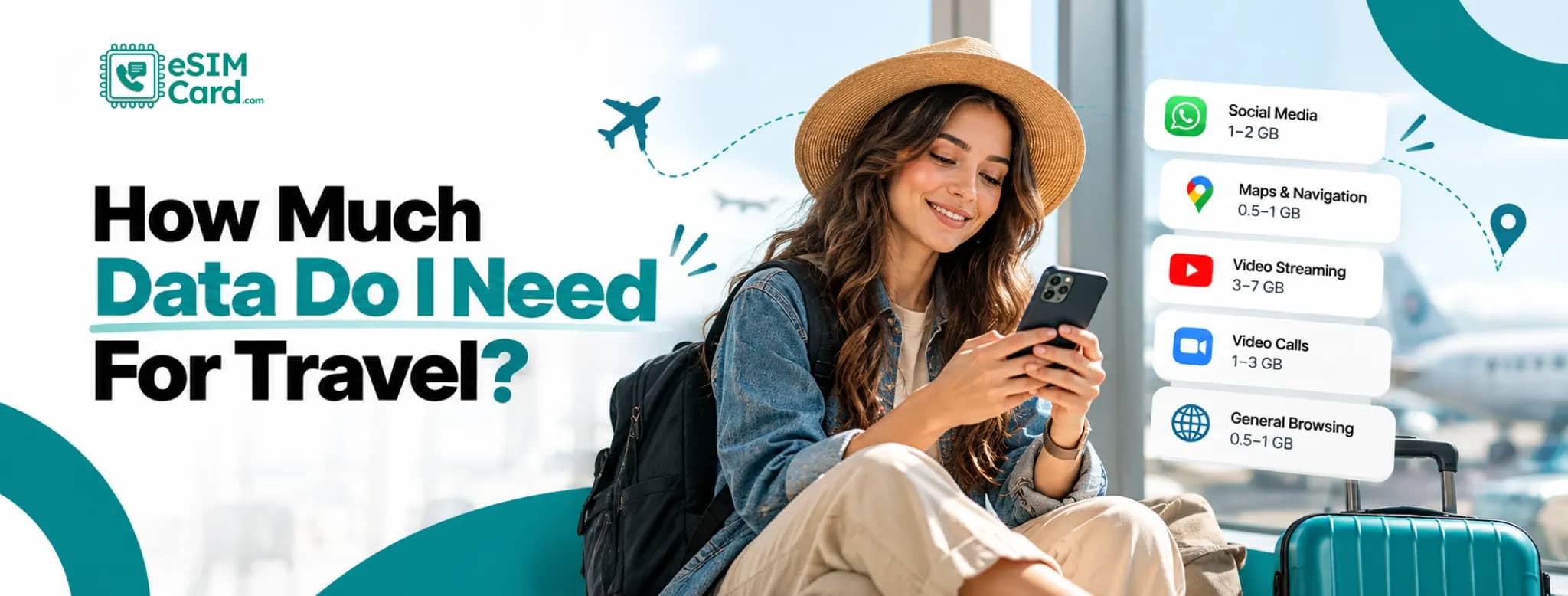
How Much Data Do Travel Apps Actually Use?
Not all screen time is equal. You could spend an hour following Google Maps and use very little data.
Spend that same hour watching HD video, and the difference can be huge. Here's a rough guide:
Treat those numbers as estimates. Your settings matter. A video at low quality uses far less data than HD.
Autoplay can also keep consuming data when you didn't plan to sit there watching videos.
Background apps matter too. Photo backups, updates, and cloud syncing can quietly chip away at your allowance.
How Much Data Do You Need for a 3-Day Trip?
For a short trip, 1GB to 3GB is often enough. Say you're spending a long weekend in Paris.
Travelers heading to Paris can choose a France eSIM based on their trip length and expected data use.
You use Google Maps to find your hotel, WhatsApp to message friends, and Google to check restaurants and opening times.
You probably don't need a huge data package for that. Things change if you're uploading videos throughout the day or watching YouTube back at the hotel without Wi-Fi. In that case, 3GB to 5GB gives you more room.
A 20GB plan for a three-day city break is probably more than you'll use unless you're a heavy streamer.
How Much Data Do You Need for a 7-Day Trip?
For one week, 3GB to 5GB should suit many travelers. Light users can sometimes get through seven days with 1GB to 3GB.
That's more realistic when Wi-Fi is available at your hotel, and you're mainly using data while you're out. Love Instagram and TikTok? You'll want more.
Seven days of Reels, Stories, and video uploads can push your usage toward 7GB to 10GB or higher.
Save the heavy stuff for Wi-Fi when you can. Downloading Netflix shows or backing up hundreds of photos doesn't need to happen over mobile data.
How Much Data Do You Need for 2 Weeks?
Two weeks gives you more time to use data, but also more time for background apps to nibble away at it.
For moderate phone use, 5GB to 10GB is a good range to look at. Light users who spend plenty of time on Wi-Fi may get by with 3GB to 5GB. Heavy users can need 15GB or more. Watch your photo backup settings here.
Your needs during international travel can also change depending on how often you have access to Wi-Fi and whether you're moving between destinations.
Two weeks of holiday photos and videos can add up, especially if everything uploads to the cloud as soon as you take it. Automatic app updates can do the same thing.
How Much Data Do You Need for a Month?
A month is harder to predict. If you're staying somewhere with reliable Wi-Fi and only using mobile data outside, 5GB to 10GB might be enough.
For more regular use, 15GB to 30GB gives you much more room. Working during the trip? Your numbers can climb quickly.
Video meetings, hotspot use, and large file downloads can take you past 30GB. At that point, an unlimited plan may be easier than watching your balance every few days.
Check the fair-use terms before buying one. Some unlimited plans have rules around high-speed data or hotspot use.
How Much Data Does Google Maps Use?
Good news. Google Maps isn't usually the app that empties your data plan.
Normal navigation may use roughly 5MB to 10MB per hour, though the exact amount changes with how you use it.
Want to cut that even further? Download the map for your destination before leaving your hotel.
Offline maps can handle basic directions without a constant connection. You'll still need mobile data for things such as live traffic and fresh search results.
Satellite view and repeatedly loading new areas can use more data than basic directions.
How Much Data Does Social Media Use?
This is where estimates get messy. Opening Instagram to check a few photos isn't the same as spending an hour watching Reels.
TikTok, Instagram, Facebook, and Snapchat are packed with video, and video eats through data much faster.
Uploading matters as well. Posting a couple of photos won't have the same effect as uploading several high-resolution videos from your day.
If you only check social apps now and then, 5GB can go a long way. If short videos are part of your daily routine, give yourself more room.
How Much Data Does Streaming Use?
Music isn't usually the problem. Video is. An hour of music may use around 40MB to 150MB, depending on the quality you've selected.
Video can jump from a few hundred megabytes per hour to well over 1GB. HD and higher resolutions are the big hitters.
There's an easy fix when you know you'll be traveling for hours. Download your movies, playlists, and podcasts on Wi-Fi before you leave. That train ride doesn't need to cost you a gigabyte.
How Much Data Do Video Calls Use?
A long video call can use more data than hours of messaging. WhatsApp, FaceTime, Zoom, Google Meet and Microsoft Teams all behave differently.
Video quality, group size, and screen sharing also change the amount used. An hour-long meeting can take hundreds of megabytes. Higher-quality calls may cross 1GB.
If you're going on holiday and making one quick family call, that's probably not a big concern. Five work meetings in a week are another matter. Count them before picking your plan.
How Much Data Do You Need for Remote Work Abroad?
Working from another country sounds great until the hotel Wi-Fi gives up halfway through a meeting.
That's when mobile data becomes your backup office. Email and Slack messages don't use much. Zoom calls, Google Meet, cloud storage and large downloads are the real data users.
If you're regularly working over mobile data, 10GB or more per week is worth considering. Frequent meetings and laptop tethering can push that toward 20GB to 30GB.
Your laptop may also use data without asking. Cloud folders sync. Software updates download. Browser tabs keep running. Check those settings before connecting through your phone.
Does Using a Hotspot Eat More Data?
Not by itself. If your laptop downloads a 100MB file through your phone, it still uses about 100MB of your mobile allowance.
But laptops tend to do more behind the scenes. Windows or macOS might download an update.
Dropbox or Google Drive could start syncing. Desktop websites can also be heavier than their mobile versions.
So hotspot users often burn through data faster, even though the hotspot itself isn't the reason.
Does 5G Use More Data Than 4G?
No, not simply because it's 5G. A 100MB file is still roughly 100MB whether you download it over 4G or 5G.
What changes is speed. When everything loads quickly, you're more likely to watch higher-quality video or stream for longer.
Some apps may also serve better-quality content on faster connections. That's why your total usage can rise on 5G even though the network isn't making the files bigger.
How to Calculate How Much Travel Data You Need
Want a number based on your habits rather than someone else's? Check how much mobile data you normally use each day.
Multiply that by the number of days you'll be away. Then add 20% to 30% for the unexpected.
Here's an example. You normally use 0.5GB per day, and you're traveling for seven days. 0.5GB × 7 = 3.5GB
Add 25%, and you're at about 4.4GB. A 5GB plan makes sense. That little bit of spare data covers things like a delayed flight, a longer video call, or a day when you can't find Wi-Fi.
Check How Much Data You Already Use
Your phone already knows a lot about your habits. Check it before buying anything.
On iPhone
- Open Settings > Cellular or Settings > Mobile Service.
- Scroll down, and you'll see how much cellular data your apps have used. You'll also find a Current Period figure.
- One catch: check when the statistics were last reset. If you haven't reset them for six months, Current Period isn't showing one month's use.
- Your carrier's app can sometimes give you a clearer monthly total.
On Android
- Android menus aren't identical across every phone.
- Start with Settings > Network & Internet or Settings > Connections. Look for mobile data or data usage.
- You should be able to see which apps are using the most data and how much you've used over a chosen period.
- Now compare that number with your trip length. Suddenly, choosing between 3GB, 5GB and 10GB becomes much easier.
How to Make Your Travel Data Last Longer
Running low halfway through a trip is annoying. A few small changes can keep that from happening.
- Download offline maps, playlists, podcasts, and shows while you're on Wi-Fi.
- Switch on Low Data Mode on iPhone or Data Saver on Android.
- Pause automatic photo and video backups.
- Stop automatic app updates over mobile data.
- Lower your streaming quality.
- Check which apps are using the most data.
- Save large downloads for trusted Wi-Fi.
- Turn off high-quality video autoplay where the app allows it.
Pay special attention to photo backups. You might spend a day taking hundreds of photos and several 4K videos.
If your phone uploads all of them over mobile data that evening, your allowance can drop quickly.
Fixed Data or Unlimited eSIM?
More data isn't always better value. Different eSIM data plans can offer fixed allowances or unlimited data, so compare the plan structure as well as the number of gigabytes.
If you know roughly what you'll use, a fixed-data plan can be all you need. Unlimited makes more sense when you don't want to count gigabytes.
It can also suit remote workers and people who stream regularly. Just read the plan details. Unlimited doesn't always mean every gigabyte runs at the same speed forever.
Pick an eSIMCard Plan That Fits the Trip
A three-day city break and a month working abroad shouldn't start with the same data plan.
For a short trip with good hotel Wi-Fi, a smaller eSIMCard plan may be enough. Two weeks of regular maps, browsing, and social media could call for 5GB to 10GB.
Crossing several borders? A regional or global eSIMCard plan may be easier than setting up a new plan in each country.
Before you buy, check the data amount, validity, network coverage, and hotspot rules. Read any fair-use terms too.
And if your plan supports top-ups, you don't always have to buy a huge allowance on day one.
You can also buy an eSIM before your trip, so your mobile data is ready when you arrive.
Conclusion
The right amount of travel data depends on what you actually do with your phone. Maps and messaging use far less than streaming, video calls, social media, or sharing data with a laptop.
Before your trip, check how much mobile data you normally use and think about how often you'll have Wi-Fi. Give yourself a little extra for busy travel days or unexpected changes.
Once you have a rough idea, choose an eSIMCard data plan that fits your trip. You'll have enough data when you need it without paying for gigabytes you're unlikely to use.
FAQs
How Much Data Do I Need for a 7-Day Trip?
For many travelers, 3GB to 5GB is enough for maps, messaging, browsing, and some social media. Heavy streaming or hotspot use may push you toward 7GB to 10GB or more.
Is 1GB Enough for a Week Abroad?
It can be if you mostly use Wi-Fi and save mobile data for maps and messages. Regular video and social media can use 1GB quickly.
Is 5GB Enough for Two Weeks?
Yes, if your phone use is light to moderate. Frequent streaming, video uploads, and hotspot use can make 5GB disappear much sooner.
Is 10GB Enough for International Travel?
For many one- or two-week holidays, yes. If you're working remotely, streaming often, or tethering a laptop, you may need more.
How Much Data Does Google Maps Use?
Standard Google Maps navigation may use around 5MB to 10MB per hour, although the amount varies. Offline maps can cut mobile data use further.
Does Wi-Fi Reduce the Data I Need?
Yes. Use trusted Wi-Fi for streaming, large downloads, backups, and long video calls. That leaves your mobile data for the times you actually need it.
Does 5G Use More Data Than 4G?
Not automatically. A file is roughly the same size on either network. Faster speeds can still lead to more streaming and higher-quality video.
Should I Get Unlimited Data for Travel?
It depends on how you use your phone. Unlimited data can suit remote work, streaming, and frequent hotspot use. A fixed plan may cost less for lighter trips.