Search

Ava Brooks
26 Dec 2025
Yes, you can. You can turn an iPhone into a dumb phone by hiding distracting apps, limiting notifications, and using Apple’s built-in Focus tools. You don’t need to delete apps or buy another phone.
This setup keeps calls, texts, maps, and mobile data working, but stops constant alerts and scrolling. It’s easy to reverse, works on the latest iOS, and is helpful for travel or eSIM users who want simple, controlled connectivity.
Your iPhone is useful and fast, but it’s also built to keep you using it. Making it a dumb phone isn’t about copying old Nokia phones. It’s about choosing what you keep and what you remove.
The good news is you don’t need a new phone, paid apps, or strict rules. You just need to set it up right. This blog will show you how and why to turn your iPhone into a dumb phone.
4.9

Highly Rated
Based on 500,000+ customer reviews

Trusted worldwide
Over 1 million travelers across the globe have trusted us

Travel Friendly
No swaps, global connectivity ensured
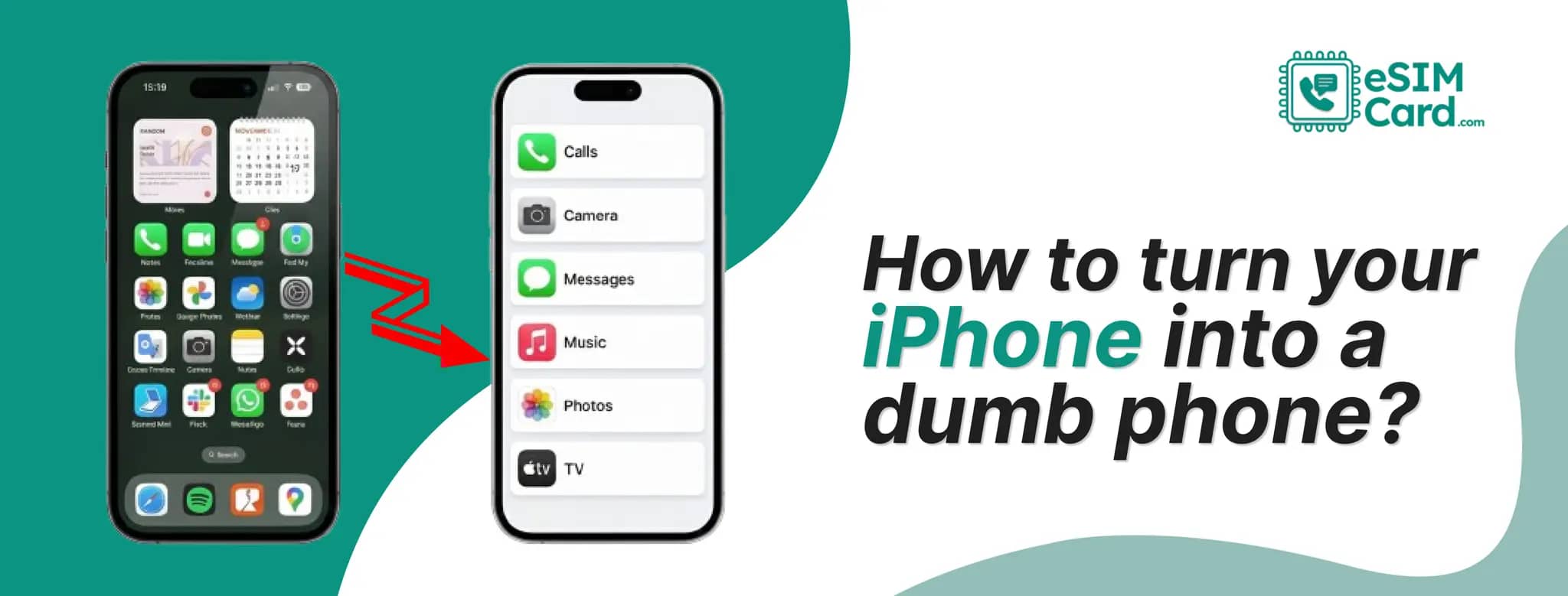
Yes, and it’s easier than you might think. There isn’t a single “dumb phone mode” on iPhone, but Apple gives you all the tools you need. Used together, these tools let your phone act like a basic device, showing only calls, messages, maps, and data, without constant social app alerts.
Your app library will be hidden, not deleted. Your data still works, but it won’t demand your attention. That’s why many people like this method instead of buying a real dumb phone.
If you use eSIM, this setup is practical and helpful. You stay connected, but only when you want to.
Most people don’t wake up thinking, “I want a dumb phone.” They reach that thought after noticing something else. Their phone is always nearby. But their attention isn’t.
The moment you unlock your iPhone, you’re pulled in. Messages, Feeds, non-stop scrolling, and alerts you didn’t ask for. Even when you open your phone for one small task, you often end up somewhere else entirely.
That’s the frustration behind this search. It’s not about hating technology. It’s about wanting a phone that works for you, not against you.
Many users, especially Gen Z, remote workers, and frequent travellers, are realising the same thing that constant access doesn’t equal control. And deleting one app doesn’t fix the habit because another takes its place.
Turning an iPhone into a dumb phone feels like a reset. A boundary or a control on your phone addiction. You can keep those functions and apps of daily use, like:
And you remove what drains time without adding value. This matters even more when you travel. New places demand attention. But a noisy phone pulls you back into the same loops. If you travel often, this guide to using eSIM when traveling anywhere in the world shows how to keep data simple while your iPhone stays minimal.
Notifications don’t care if you’re on a train in Italy or sitting at home. That’s why many travellers combine a minimalist iPhone setup with a clean mobile connection, like an eSIMCard plan. If you’re new to this, start with a quick guide on what an eSIM is and how it works on iPhone so this setup feels easier to manage. No physical SIM swaps. No store visits. Just data when you need it, without carrier clutter or extra apps pushing notifications.
People don’t actually want a real dumb phone. They want the feeling of one.
Real dumb phones come with problems:
That’s not freedom. That’s friction. What people are really searching for is intentional use.
They want their iPhone to behave like a tool again or a communication medium.
Apple already gives you the ability to do this. You just have to set it up with purpose. Strip it down. Make it boring. Let it disappear until you need it.
When paired with something flexible like eSIMCard, where you control your data without long contracts or roaming surprises, the setup makes sense long term. Your phone stays useful, but quiet. Connected, but not demanding.
That’s the balance people are chasing when they search for how to turn an iPhone into a dumb phone. And it’s entirely possible, without buying anything new.
No, there isn’t a single switch called “dumb phone mode.” Like Android's “Battery Saver” or “Ultra mode”, most people think that one tap turns their iPhone into something simpler. Apple doesn’t label it that way.
But yes, you can make your iPhone behave like a dumb phone using tools that are already built in:
When combined, these remove distractions without essential use like calls, texts, maps, or mobile data. This is important for travellers and daily users alike. You don’t lose access to ride apps, boarding passes, or emergency contacts.
And when paired with a flexible data setup like eSIMCard, you’re not locked into carrier apps or bloated system tools either. The phone stays smart, but your habits change.
You might’ve seen searches or videos mentioning things like:
There’s no hidden code. No Easter egg. Most of this confusion comes from:
People see the result as a clean, quiet phone, but miss how it was built.
Not officially, but Apple gives you building blocks, not presets. Minimalist setups usually rely on:
Some phones sell this as a feature. Apple doesn’t. You can design your own version, one that still works when you travel, switch countries, or rely on mobile data. That’s where setups like an eSIMCard connection quietly help. Minimalism isn’t about removing power. It’s about removing noise.
If you skip this understanding and jump straight into toggles, most setups fail within days. People either lock themselves out too hard or leave loopholes everywhere.
The goal isn’t punishment. It’s friction where it matters and freedom where it counts.
Let’s learn how to actually turn your iPhone into a dumb phone step by step without regret.
If you want your iPhone to behave like a dumb phone, you don’t need to punish yourself. You just need to reset what your phone is for.
Start by Keeping Only What You Truly Need. Before changing any settings, slow down for a minute and answer this honestly:
Obviously, you want your phone to make:
That’s it. Now take everything else off your Home Screen. I dont mean to delete them, but just remove from view.
When apps aren’t visible, they lose power. This is one of the simplest changes, and the actual meaning of turning your phone into a dumb phone.
A setup that actually reduces distraction:
Put only essential apps on that first screen. Everything else stays in the App Library.
When your thumb doesn’t see anything interesting, it stops wandering. That’s how habits change without effort.
Focus Modes are where your iPhone really changes behaviour. Set up a straightforward Focus:
Turn it on when you want your phone to behave like a basic device. Turn it off when you don’t.
This part sounds odd until you try it. Because of the addiction to scrolling, you lose yourself in your device, resulting in massive time loss.
The best way is to turn your screen to grayscale, just during the day.
Without any colour on your device:
Your phone still works the same. It just stops demanding attention. Many people say this one change reduced their screen time without any effort.
If you ask someone about the issue, they will tell you to delete the apps entirely. That usually backfires. A better approach is:
When there’s a pause before an app opens, you notice what you’re doing. Over time, the habit weakens on its own.
A real dumb phone removes options. Buying a dumb phone will end the back to original iPhone experience option, especially when you are travelling and want to use your banking apps.
But turning your iPhone into a dumb phone gives you control. You can:
And when your connectivity is simple, like using eSIMCard instead of a physical SIM, the experience feels cleaner. Just a phone that does what you ask, and nothing more.
When people say they want a “dumb phone,” they usually don’t mean it literally. What they’re really asking for is relief.
An actual dumb phone removes features. A minimalist iPhone changes behavior. That difference matters. Most people still need:
A real dumb phone can’t handle that. A stripped-back iPhone can. That’s why the minimalist route works better long term. You keep capability, but you remove temptation.
You don’t need paid tools or subscriptions to make this work. Apple has already built everything you need. It just doesn’t advertise it well.
You can simply turn your iPhone into a dumb phone:
This is why the setup sticks. You’re not fighting your phone. You’re redesigning how it behaves. Once your Home Screen is clean, Focus Modes are active, and your screen is visually dull, your iPhone already feels different. Lighter. Quieter. More intentional. Most people notice the change within a day.
Visually, no. Functionally, yes. The Nothing Phone and similar devices sell simplicity through design. Apple does it through control, just without the marketing. When:
Your iPhone stops feeling like a feed machine. It starts acting like a tool again. That’s the experience people are chasing when they search for dumb phones. They just don’t always have the words for it.
This is another standard search, especially among travellers and people who want separation. When people say “burner phone,” they usually mean:
Modern iPhones already do this, through eSIM. With an eSIM, you can:
This makes a minimalist iPhone far more practical than carrying a second device. It’s cleaner, safer, and easier to manage.
Using an eSIMCard plan fits naturally here. You stay flexible without changing SIMs, visiting carrier stores, or verifying paperwork. For travel, especially, this setup feels closer to a “burner” experience, minus the downsides.
A dumb phone mindset is about control. eSIMs are about control, too. When you combine both, things click. With eSIMCard:
That pairs perfectly with a minimalist iPhone setup. Your phone stays simple. Your connection stays flexible. And you don’t lose access when you actually need it.
Most people don’t want less technology. They want less noise. Turning your iPhone into a dumb phone isn’t about going backwards. It’s about choosing what deserves your attention.
With the correct settings and a flexible connection like eSIMCard, your phone can stay useful without being overwhelming. Quiet, Focused, & On your terms.
Yes. You can delete most apps and hide others from view. System apps can’t all be removed, but they can be ignored.
No. Calls, texts, and data work normally. This setup only changes how distractions behave. You can even pair it with short-term eSIM data plans to keep your travel data separate from your main number.
Yes. That’s the advantage of this approach. Nothing is permanent.
It does. Apple continues to expand Focus and privacy controls, which makes this easier over time.
4.9

Highly Rated
Based on 500,000+ customer reviews

Trusted worldwide
Over 1 million travelers across the globe have trusted us

Travel Friendly
No swaps, global connectivity ensured
With eSIM Card, you can save 100% on roaming fees